Backups
This software allows you to export and import the database. The export and import features can be used for basic backups or data migration.
Procedure
- Go to the upper-right menu and select Settings.
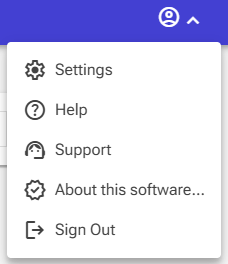
- Click the System Administration tab.
- Click Create backup to create a backup of the database.
- Click Restore backup to restore a backup of the database.
Warning: Use caution when importing a database. Importing will overwrite the current database, and this action cannot be undone.
Alternative procedure
There is alternative, more low-level, procedure which could be used too;
- Make sure the software is stopped
-
Go to the data folder, by default this is;
-
Windows:
C:\Users\<username>\AppData\Local\SDH Software\PTP - MacOS:
~/.local/share/SDH Software/PTP - Linux:
~/.local/share/SDH Software/PTP
.. and copy (of replace) the file named database.db.