Company Departments
Overview
Each company location can contain one or more departments. In the software, a department is defined by a Department Name and is directly linked to a specific company location. Common examples include Administration, HR, Marketing, Sales, Operations, Engineering, and Support.

Role
Departments form a foundational part of your master data and serve as primary filters throughout the software.
Prerequisites
At least one department must be created for the software to function properly. Ensure you have already created at least one Company Location before adding departments.
Operation & Functions
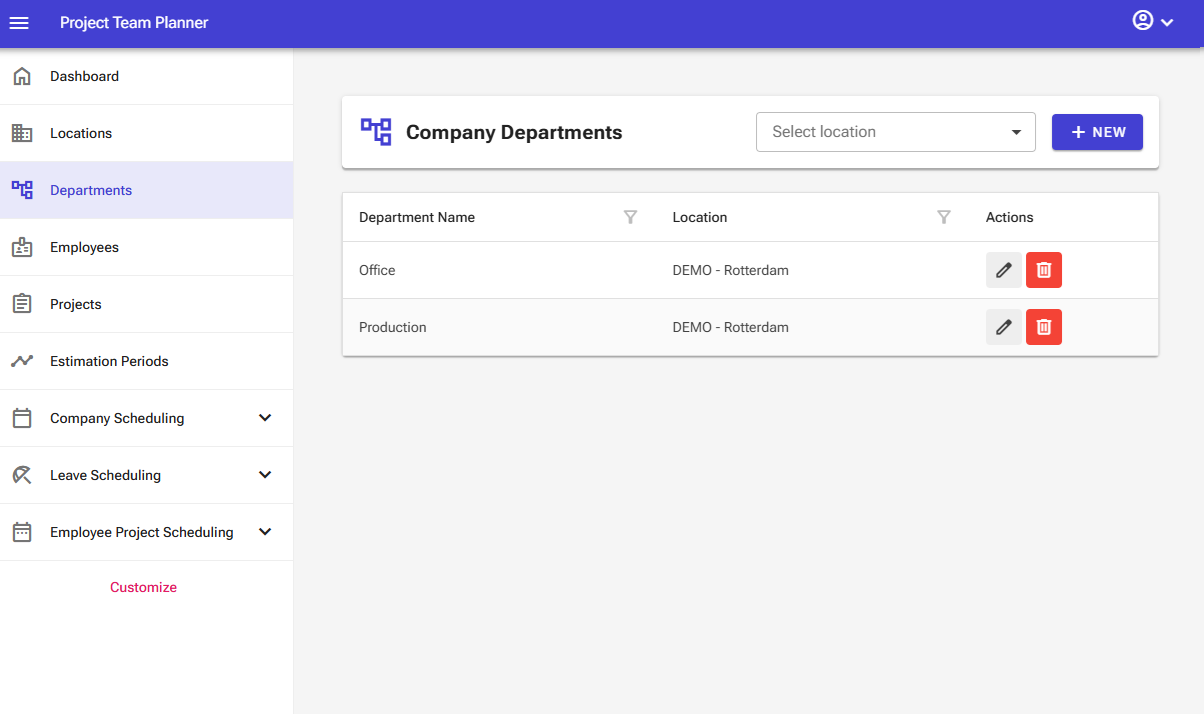
The branch management screen contains the following elements:
- View filter: The top bar features a dropdown menu that allows you to filter departments by location.
- New button: The top bar features a "New" button that allows you to add new departments.
- Overview: The screen displays an interactive table that lets you sort, filter, and search using the column headers.
The overview itself contains the following controls:
- Edit button: Allows you to edit an item.
- Delete button: Allows you to delete an item.
Note: In the server edition of the software, certain elements may not be visible depending on your user permissions.
Adding a Department
To add a new department:
- Select Departments from the left navigation menu.
- Click New.

- Enter the Department Name and select the associated Company Location in the input form.
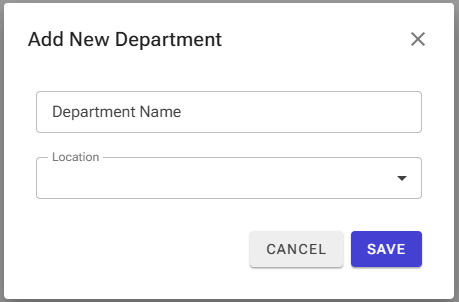
- Click Save.
Editing a Department
To update an existing department:
- Select Departments from the left navigation menu.
- Locate the target item and click Edit.

- Update the necessary fields and save your changes.
Deleting a Department
To remove a department:
- Select Departments from the left navigation menu.
- Locate the target item and click Delete.

- Confirm the deletion in the pop-up window.
Warning: Exercise extreme caution when deleting a department. Deleting a department automatically removes all associated employees, projects, and schedules.